The body is three-dimensional, but much of the information used to study it arrives in separate formats. Textbooks flatten structures into illustrations, CT and MRI systems divide them into sequential images, and videos present a fixed progression chosen by the author. A connected learning environment emerges when an interactive anatomy platform brings complete anatomy, sectional imaging, and guided interaction together.
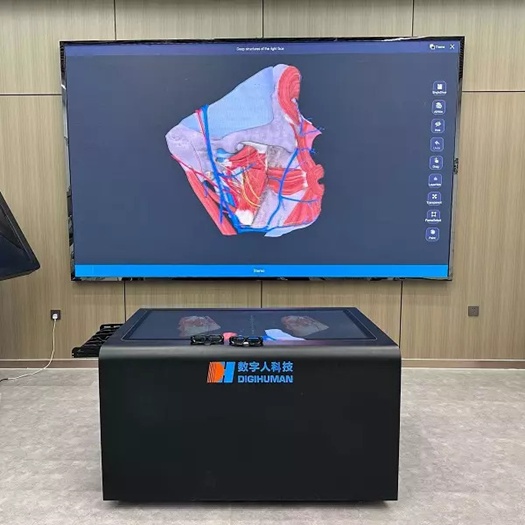
A Three-Dimensional Reference for Orientation
A reconstructed model gives learners a stable spatial reference before they interpret more specialized material. On a virtual anatomy table, structures can be rotated, enlarged, isolated, or viewed together with their anatomical neighbors.
The complete model answers questions about position and continuity. It can show where an organ sits within a cavity, how a vessel travels between regions, or why a nerve changes direction along its course. Once that framework is understood, an isolated structure becomes easier to place mentally within the body.
High-resolution data is important because small branches, boundaries, and tissue relationships may disappear in an oversimplified model. Useful detail must still be balanced with clear labeling and an interface that does not overwhelm the learner.
Translating Tomographic Images Into Spatial Form
CT and MRI sequences display the body one section at a time. A digital anatomy system can relate each slice to the larger three-dimensional structure, helping learners understand how anatomical shapes change across consecutive images.
An organ with a curved or tapered form illustrates this problem clearly. Its outline may appear large in one section, narrow in the next, and absent several slices later. Without a spatial reference, these differences may look like unrelated objects. Comparing the sequence with the three-dimensional anatomical model helps explain that the images represent different cross-sectional views through anatomical structures.
DIGIHUMAN also lists more than 1,700 CT and MRI images derived from tomographic specimens as part of the table’s imaging resources. Within a lesson, these images can support the transition from visible anatomy to the sectional patterns used in medical imaging.
Interaction as a Form of Inquiry
The learner does more than watch when using a virtual anatomy table. Touch operations permit a prediction to be tested: a model can be turned to verify orientation, a superficial structure can be removed to inspect what lies beneath, or a sectional plane can be adjusted to examine a changing outline.
This sequence resembles inquiry because the action follows a question. The learner first identifies uncertainty, chooses an operation, observes the result, and then revises the explanation. An instructor can structure the process by asking students to anticipate what the next layer or image will reveal.
Repeated investigation also supports correction. A mistaken identification does not end the exercise; the model can be restored and inspected through another route. The educational gain comes from explaining the evidence revealed by each operation.
Adding Videos, Animations, and Assessment
Three-dimensional models explain spatial arrangement, while other resources address movement, procedure, and knowledge consolidation. DIGIHUMAN’s virtual anatomy resources also include real dissection videos and anatomy animations that can complement the three-dimensional model
A dissection video can demonstrate how tissues are approached and separated. An animation can clarify a physiological sequence or emphasize a relationship that changes over time. Test-question resources then provide a way to check whether learners can identify, compare, or apply what they have observed.
These materials need not be used simultaneously. A lesson may begin with a model, introduce a short video at a key point, and finish with questions based on a sectional image. Purposeful sequencing can help keep a rich resource library focused rather than turning it into a distracting collection of media
The order can also be reversed when diagnostic reasoning is the goal. Students may first receive an unfamiliar section, identify visible landmarks, and then consult the three-dimensional reconstruction to test their interpretation. A later animation or dissection video can explain why the observed relationship exists.
Such variation matters because recognition and recall are not identical skills. Seeing a labeled structure supports orientation, while finding it independently in another format requires transfer of knowledge.
Connecting Resources Across Learning Settings
DIGIHUMAN‘s digital anatomy offerings also support AR/VR technologies, allowing selected anatomy resources to be used in immersive learning environments. Support for computers, tablets, and smartphones also allows selected content to move beyond the primary display. A large table may suit group demonstration, a computer may support individual review, and a mobile device may provide convenient access to reference material.
DIGIHUMAN reports that its systems are used in more than 40 countries and identifies physicians, medical students, and researchers among its intended users. Its combination of UHD anatomical data, tomographic images, animations, real dissection videos, test resources, and AR/VR compatibility reflects a multi-format learning model.
Each format contributes a distinct kind of evidence: the model establishes orientation, imaging reveals sectional appearance, interactive controls expose relationships, and supporting media reinforces interpretation. When all of them address the same anatomical question, separate visual materials become a coherent explanation of the body.